Build a RAG System in 5 Minutes with Google Gemini File Search
A practical guide to building document search and Q&A systems using Gemini File Search Tool announced in November 2025, without complex RAG pipelines. Dramatically reduce development time with fully-managed RAG.
Overview
On November 7, 2025, Google announced a revolutionary feature developers had been waiting for: the Gemini API File Search Tool. This isn’t just a simple file search function. It’s a fully-managed RAG (Retrieval Augmented Generation) system that completely changes the game for building document-based Q&A systems.
Why Is It Revolutionary?
Traditionally, building a RAG system required these complex tasks:
- 📄 Document Chunking: Splitting documents into appropriate sizes
- 🔢 Embedding Generation: Converting each chunk into vectors
- 🗄️ Vector Database Management: Setting up and operating Pinecone, Weaviate, Chroma, etc.
- 🔍 Search Pipeline Optimization: Tuning similarity search algorithms
- 🔄 Continuous Maintenance: Infrastructure scaling, cost management
File Search Tool automates all of this, allowing developers to upload files and immediately start asking questions. Like OpenAI’s Assistants API did, but with Google’s powerful Gemini models.
What Is File Search Tool?
RAG Basics
RAG (Retrieval Augmented Generation) is a technique to overcome LLM limitations. LLMs only know up to their training data and don’t know the latest information or company-specific internal documents. RAG solves this problem like this:
graph LR
    A[User Question] --> B[Document Search]
    B --> C[Relevant Document Fragments]
    C --> D[LLM + Documents]
    D --> E[Accurate Answer]
Traditional Approach vs File Search Tool
Traditional Approach (Self-built):
# 1. Load documents
documents = load_documents("./docs")

# 2. Chunking
chunks = text_splitter.split(documents)

# 3. Generate embeddings
embeddings = openai_embeddings.embed(chunks)

# 4. Store in vector DB
vector_db = Pinecone.from_documents(chunks, embeddings)

# 5. Search and generate
relevant_docs = vector_db.similarity_search(query)
answer = llm.generate(query + relevant_docs)
File Search Tool (Fully-managed):
# 1. Create Store
store = client.file_search_stores.create(
    config={'display_name': 'My Knowledge Base'}
)

# 2. Upload file (chunking, embedding automatic)
operation = client.file_search_stores.upload_to_file_search_store(
    file='document.pdf',
    file_search_store_name=store.name
)

# 3. Ask questions (search, generation automatic)
response = client.models.generate_content(
    model="gemini-2.5-flash",
    contents="What is the main content of this document?",
    config=types.GenerateContentConfig(
        tools=[
            types.Tool(
                file_search=types.FileSearch(
                    file_search_store_names=[store.name]
                )
            )
        ]
    )
)
See the difference? The code is reduced by over 60%, and complex configuration is completely eliminated.
How It Works
File Search Tool operates in three main stages:
sequenceDiagram
    participant U as User
    participant API as Gemini API
    participant Store as File Search Store
    participant VDB as Vector DB
    participant LLM as Gemini Model

    U->>API: Upload File
    API->>Store: Store File
    Store->>Store: Auto Chunking
    Store->>VDB: Generate and Store Embeddings

    U->>API: Send Question
    API->>VDB: Semantic Search
    VDB->>API: Return Relevant Document Chunks
    API->>LLM: Context + Question
    LLM->>U: Generate Answer
Stage 1: Indexing
When you upload a file, these happen automatically:
- Auto Chunking: Document split into semantic units (default 400 tokens)
- Embedding Generation: Each chunk converted to 768-dimensional vector
- Vector Storage: Stored in Google’s managed vector database
Stage 2: Retrieval
When a user asks a question:
- Convert question to embedding (free!)
- Search for most relevant chunks using cosine similarity
- Select top-K document fragments
Stage 3: Generation
Gemini model generates the answer:
- Use retrieved documents as context
- Combine with original question to form prompt
- Generate accurate, grounded answer
- Include citation information
Key Features
1. Extensive File Format Support
File Search Tool supports 300+ file formats:
Application Files (100+ types):
- PDF, DOCX, XLSX, PPTX
- JSON, XML, YAML
- SQL, SQLite databases
Text Files (200+ types):
- Markdown, HTML, CSV
- Python, JavaScript, Java, Go, and all major programming languages
- Log files, configuration files
2. Custom Chunking Configuration
You can adjust chunking strategy to match document characteristics:
config={
    'chunking_config': {
        'white_space_config': {
            'max_tokens_per_chunk': 400,  # Max tokens per chunk
            'max_overlap_tokens': 40       # Overlap between chunks
        }
    }
}
Recommended Settings:
- FAQ Documents: 200 tokens (short, concise info)
- Technical Manuals: 400 tokens (default, balanced)
- Research Papers: 600 tokens (long context needed)
3. Metadata Filtering
Add metadata when uploading files to refine search:
custom_metadata=[
    {"key": "author", "string_value": "Robert Graves"},
    {"key": "department", "string_value": "Engineering"},
    {"key": "year", "numeric_value": 2025},
    {"key": "is_public", "boolean_value": True}
]
4. Citation Tracking
Verify sources to increase answer credibility:
response = client.models.generate_content(...)

if hasattr(response, 'grounding_metadata'):
    for citation in response.grounding_metadata.citations:
        print(f"Source: {citation.source}")
        print(f"Citation text: {citation.text}")
5. Free Query Embeddings
While embedding generation typically costs money, File Search Tool provides query embeddings for free. Costs only occur during indexing ($0.15 / 1M tokens).
Hands-On: Getting Started with Python
Let’s actually use File Search Tool. This tutorial uses code I personally tested.
Environment Setup
Using uv (Recommended):
# Install uv (if not already installed)
curl -LsSf https://astral.sh/uv/install.sh | sh

# Create project directory
mkdir gemini-file-search-demo
cd gemini-file-search-demo

# Create Python virtual environment
uv venv
source .venv/bin/activate  # Unix/macOS
# .venv\Scripts\activate  # Windows

# Install required packages
uv pip install google-genai streamlit python-dotenv
Using traditional pip:
# Python 3.9+ required
python --version

# Install packages
pip install google-genai streamlit python-dotenv
Get API Key
- Access Google AI Studio
- Select “Get API key” from left menu
- Click “Create API key” button
- Copy API key
Create .env file:
GEMINI_API_KEY=your-api-key-hereBasic Example Code
A fully working example:
import os
import time
from google import genai
from google.genai import types
from dotenv import load_dotenv

# Load environment variables
load_dotenv()

# Initialize client
client = genai.Client()

# 1. Create File Search Store
print("Creating Store...")
store = client.file_search_stores.create(
    config={'display_name': 'My First Knowledge Base'}
)
print(f"✓ Store created: {store.name}")

# 2. Upload file
print("\nUploading file...")
operation = client.file_search_stores.upload_to_file_search_store(
    file='document.pdf',  # Change to actual file path
    file_search_store_name=store.name,
    config={
        'display_name': 'Sample Document',
        'chunking_config': {
            'white_space_config': {
                'max_tokens_per_chunk': 400,
                'max_overlap_tokens': 40
            }
        }
    }
)

# 3. Wait for upload completion
while not operation.done:
    print("Indexing...")
    time.sleep(5)
    operation = client.operations.get(operation)

print("✓ File upload complete")

# 4. Ask question
print("\nProcessing question...")
response = client.models.generate_content(
    model="gemini-2.5-flash",
    contents="Summarize the main content of this document in 3 points.",
    config=types.GenerateContentConfig(
        tools=[
            types.Tool(
                file_search=types.FileSearch(
                    file_search_store_names=[store.name]
                )
            )
        ],
        temperature=0.2
    )
)

print("\n=== Answer ===")
print(response.text)

# 5. Check citations
if hasattr(response, 'grounding_metadata'):
    print("\n=== Sources ===")
    for idx, citation in enumerate(response.grounding_metadata.citations, 1):
        print(f"{idx}. {citation.source}")
Streamlit Web App Demo
A web interface I actually implemented and tested. You can run it with uv run python -m streamlit run web_app.py.
Web App Structure
Since the full implementation code is long, here are the key parts:
import streamlit as st
from google import genai
from google.genai import types
import time
import os
import uuid

# Page config
st.set_page_config(
    page_title="Gemini File Search",
    page_icon="🔍",
    layout="wide"
)

# Initialize session state
if "client" not in st.session_state:
    st.session_state.client = None
if "store" not in st.session_state:
    st.session_state.store = None
if "chat_history" not in st.session_state:
    st.session_state.chat_history = []

# Client initialization function
def initialize_client(api_key):
    try:
        os.environ["GEMINI_API_KEY"] = api_key
        client = genai.Client()
        return client, None
    except Exception as e:
        return None, str(e)

# File upload function
def upload_file(client, file, store_name):
    try:
        # Create temporary file
        file_ext = os.path.splitext(file.name)[1]
        temp_file = f"temp_{uuid.uuid4().hex}{file_ext}"

        with open(temp_file, "wb") as f:
            f.write(file.getbuffer())

        # Upload
        operation = client.file_search_stores.upload_to_file_search_store(
            file=temp_file,
            file_search_store_name=store_name,
            config={
                "display_name": file.name,
                "chunking_config": {
                    "white_space_config": {
                        "max_tokens_per_chunk": 400,
                        "max_overlap_tokens": 40
                    }
                }
            }
        )

        # Wait for completion
        while not operation.done:
            time.sleep(2)
            operation = client.operations.get(operation)

        # Delete temporary file
        if os.path.exists(temp_file):
            os.remove(temp_file)

        return True, None

    except Exception as e:
        return False, str(e)

# Query function
def query_store(client, question, store_name):
    try:
        response = client.models.generate_content(
            model="gemini-2.5-flash",
            contents=question,
            config=types.GenerateContentConfig(
                tools=[
                    types.Tool(
                        file_search=types.FileSearch(
                            file_search_store_names=[store_name]
                        )
                    )
                ],
                temperature=0.2
            )
        )

        # Extract citation information
        citations = []
        if hasattr(response, "grounding_metadata") and response.grounding_metadata:
            if hasattr(response.grounding_metadata, "citations"):
                for citation in response.grounding_metadata.citations:
                    citations.append({
                        "source": getattr(citation, "source", "N/A"),
                        "text": getattr(citation, "text", "")[:100]
                    })

        return response.text, citations, None

    except Exception as e:
        return None, None, str(e)

# UI composition
st.title("🔍 Gemini File Search")
st.markdown("Document search and Q&A system using Google Gemini API's File Search Tool")

# Sidebar - Settings
with st.sidebar:
    st.header("⚙️ Settings")

    api_key = st.text_input(
        "Gemini API Key",
        type="password",
        value=os.getenv("GEMINI_API_KEY", ""),
        help="API key issued from Google AI Studio"
    )

    if api_key and not st.session_state.client:
        client, error = initialize_client(api_key)
        if client:
            st.session_state.client = client
            st.success("✓ Client initialized")
        else:
            st.error(f"Initialization failed: {error}")

    # Store management
    if st.session_state.client:
        st.header("📁 Store Management")

        new_store_name = st.text_input("Store Name", value="My Knowledge Base")
        if st.button("Create"):
            store = client.file_search_stores.create(
                config={"display_name": new_store_name}
            )
            st.session_state.store = store
            st.success(f"✓ Store created: {store.name}")
            st.rerun()

# Tabs for feature separation
tab1, tab2 = st.tabs(["💬 Q&A", "📤 File Upload"])

# Q&A tab
with tab1:
    st.header("Question & Answer")

    # Display chat history
    for chat in st.session_state.chat_history:
        with st.chat_message("user"):
            st.write(chat["question"])

        with st.chat_message("assistant"):
            st.write(chat["answer"])

            if chat.get("citations"):
                with st.expander("📚 Citations"):
                    for i, citation in enumerate(chat["citations"], 1):
                        st.markdown(f"**{i}. {citation['source']}**")
                        st.text(f"   {citation['text']}...")

    # Question input
    question = st.chat_input("Enter your question...")

    if question:
        with st.chat_message("user"):
            st.write(question)

        with st.chat_message("assistant"):
            with st.spinner("Generating answer..."):
                answer, citations, error = query_store(
                    st.session_state.client,
                    question,
                    st.session_state.store.name
                )

                if answer:
                    st.write(answer)

                    if citations:
                        with st.expander("📚 Citations"):
                            for i, citation in enumerate(citations, 1):
                                st.markdown(f"**{i}. {citation['source']}**")
                                st.text(f"   {citation['text']}...")

                    # Add to history
                    st.session_state.chat_history.append({
                        "question": question,
                        "answer": answer,
                        "citations": citations
                    })
                else:
                    st.error(f"Error: {error}")

# File upload tab
with tab2:
    st.header("File Upload")

    uploaded_files = st.file_uploader(
        "Select files",
        accept_multiple_files=True,
        type=["pdf", "txt", "docx", "md", "csv"],
        help="You can upload PDF, TXT, DOCX, Markdown, CSV files"
    )

    if uploaded_files and st.button("Start Upload", type="primary"):
        progress_bar = st.progress(0)

        for i, file in enumerate(uploaded_files):
            success, error = upload_file(
                st.session_state.client,
                file,
                st.session_state.store.name
            )

            if success:
                st.success(f"✓ {file.name}")
            else:
                st.error(f"✗ {file.name}: {error}")

            progress_bar.progress((i + 1) / len(uploaded_files))

        st.rerun()
Running the App
# Run Streamlit
uv run python -m streamlit run web_app.py

# Or traditional way
streamlit run web_app.py
Access http://localhost:8501 in your browser to see the interface.
Actual Implementation Screens
1. Main Screen and Store Creation
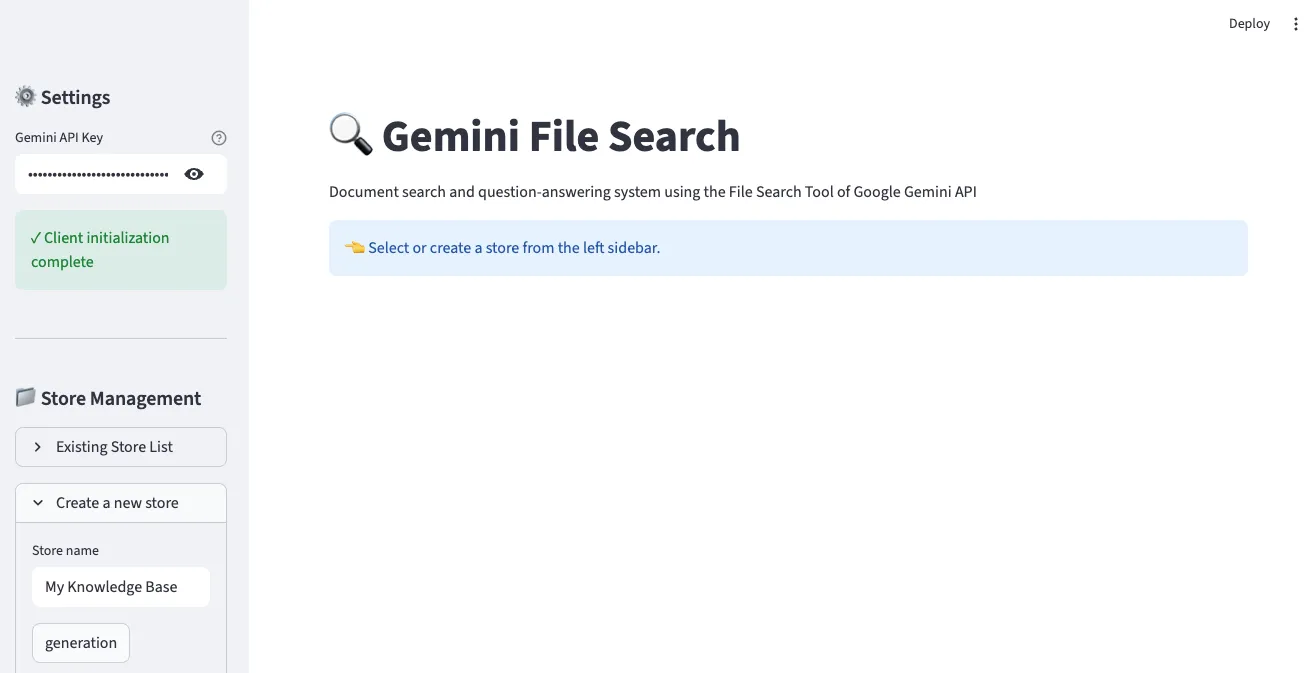
In the left sidebar, you can enter your Gemini API key and create a Store. Enter a Store name and click the “generation” button to create a new File Search Store.
2. File Upload Interface
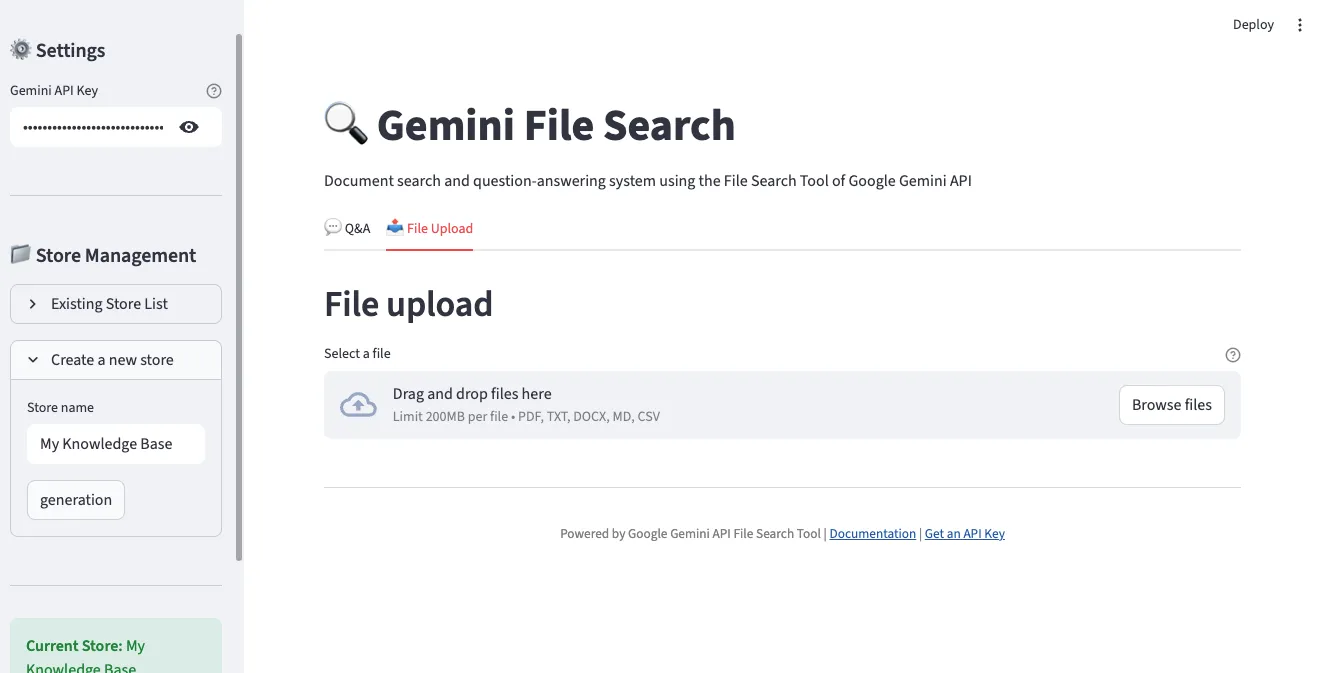
In the “File Upload” tab, you can select and upload multiple files simultaneously. Supports various formats including PDF, TXT, DOCX, Markdown, and CSV.
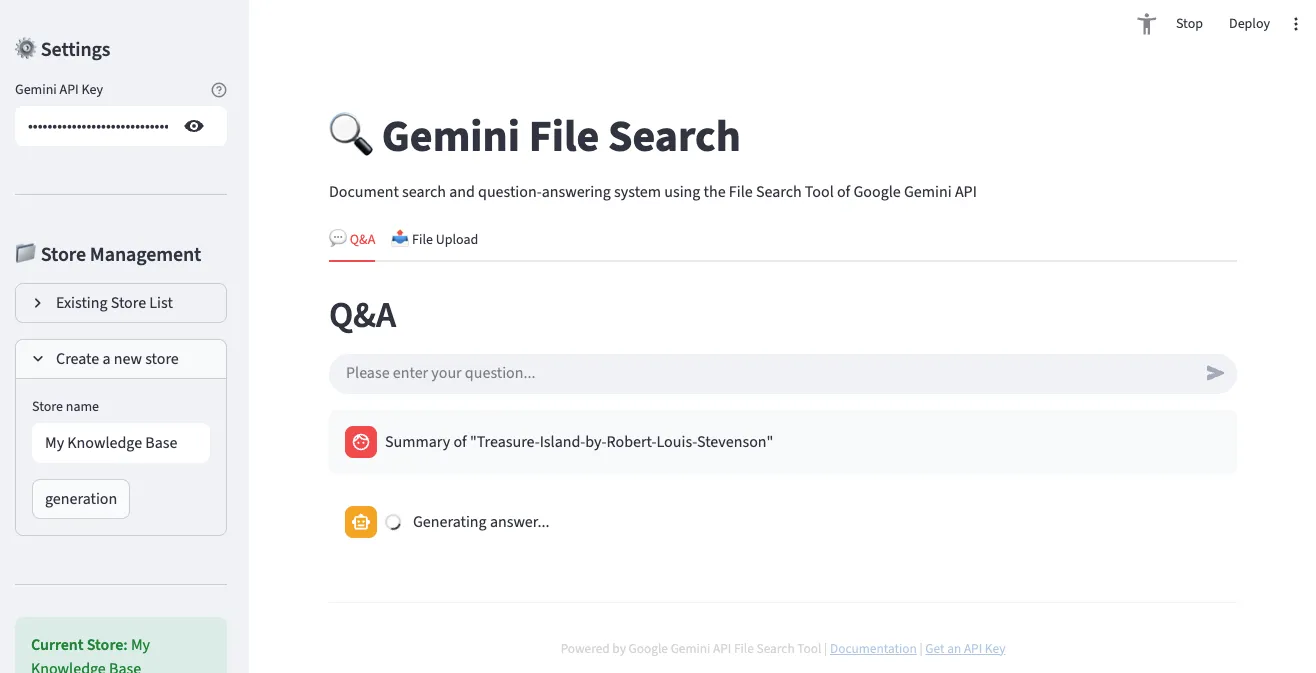
3. Q&A Interface
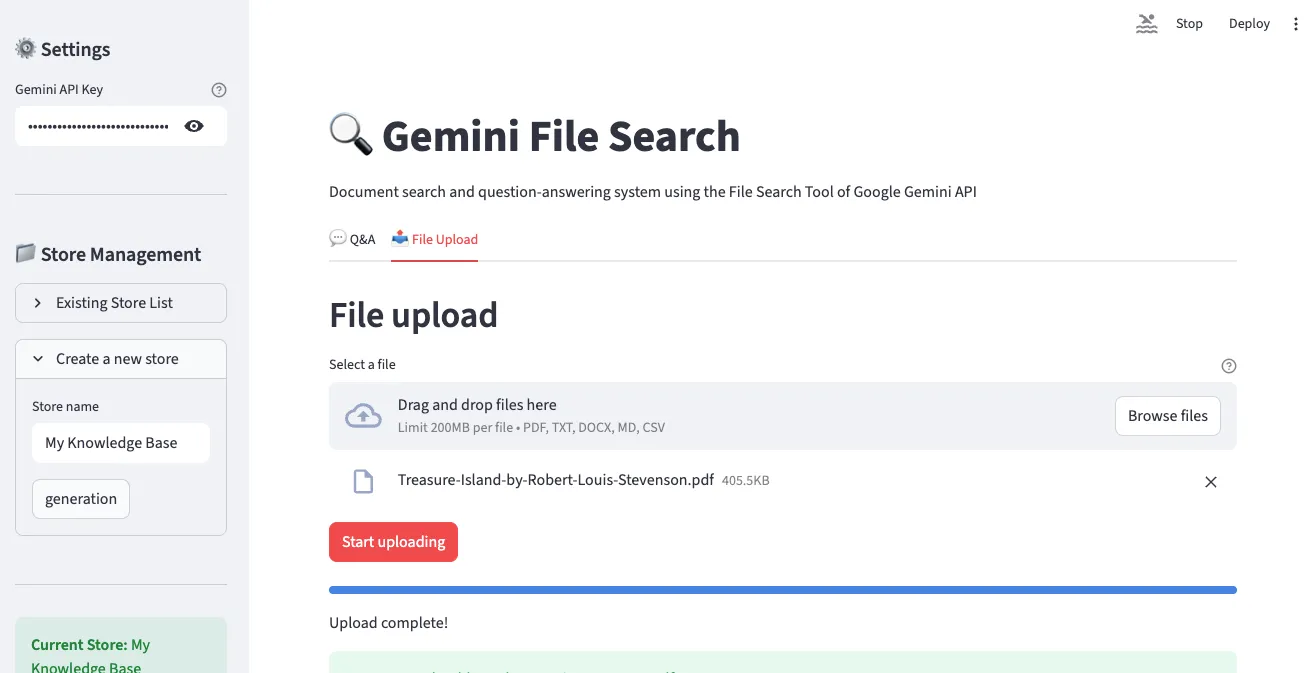
In the “Q&A” tab, you can ask questions about uploaded documents in natural language. The conversation proceeds in chat format, with citations displayed alongside answers.
4. Store Management and File List
You can check the information of the currently selected Store and the list of uploaded files.
5. Q&A Result Example
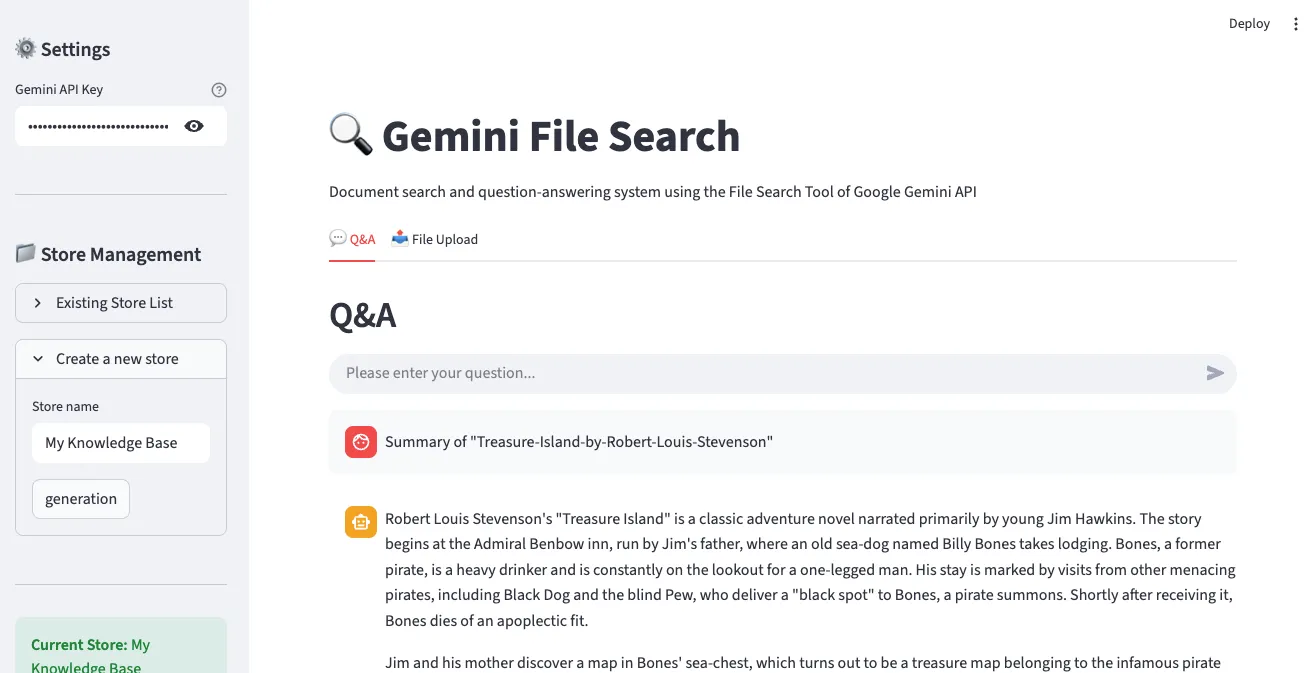
Answers to actual questions are displayed, and you can verify the document sources that served as the basis for the answers.
Key Features
- ✅ API key configuration and client initialization
- ✅ File Search Store creation and management
- ✅ File upload (supports multiple files simultaneously)
- ✅ Interactive Q&A (chat interface)
- ✅ Citation display
- ✅ Upload progress indication
Comparison with Existing Solutions
OpenAI Assistants File Search vs Gemini File Search
| Feature | OpenAI Assistants | Gemini File Search |
|---|---|---|
| Supported File Formats | 20+ types | 300+ types |
| Max File Size | 512MB | 100MB |
| Free Query Embeddings | ✗ | ✓ |
| Chunking Customization | Limited | Fine-grained control |
| Metadata Filtering | ✓ | ✓ (future enhancement) |
| Pricing (Indexing) | $0.10 / GB/day | $0.15 / 1M tokens |
| Model Performance | GPT-4 Turbo | Gemini 2.5 Pro/Flash |
LangChain + Vector DB vs Managed RAG
| Aspect | Self-built (LangChain) | Gemini File Search |
|---|---|---|
| Setup Complexity | High (chunking, embeddings, vector DB) | Low (file upload only) |
| Development Time | Days to weeks | Minutes |
| Maintenance | Continuous management needed | Google manages |
| Scaling | Manual scaling | Auto-scaling |
| Cost Prediction | Complex (infra + ops) | Clear (usage-based) |
| Customization | Full control | Limited control |
| Initial Cost | High (learning curve) | Low (immediate start) |
When to Use What?
Choose Gemini File Search:
- ✅ Rapid prototyping and MVP development
- ✅ Small to medium-scale document search systems
- ✅ Limited development resources
- ✅ Want to minimize infrastructure management
Consider Self-building:
- ✅ Need full control and customization
- ✅ Require special embedding models
- ✅ On-premise deployment is mandatory
- ✅ Extremely large scale documents (hundreds of GB+)
Real-World Use Cases
1. Customer Support System
Scenario: Build 24/7 auto-response system based on SaaS product FAQs and technical docs
# Create support store
support_store = client.file_search_stores.create(
    config={'display_name': 'Customer Support KB'}
)

# Upload FAQ documents (using short chunks)
faq_files = ['general_faq.pdf', 'technical_faq.pdf', 'billing_faq.pdf']

for faq in faq_files:
    operation = client.file_search_stores.upload_to_file_search_store(
        file=faq,
        file_search_store_name=support_store.name,
        config={
            'chunking_config': {
                'white_space_config': {
                    'max_tokens_per_chunk': 200,  # Short answers for FAQ
                    'max_overlap_tokens': 20
                }
            }
        }
    )
    # Wait for completion...

# Handle customer questions
def answer_customer(question):
    response = client.models.generate_content(
        model="gemini-2.5-flash",
        contents=f"""Customer Question: {question}

        Please answer the above question in the following format, referring to FAQ documents:
        1. Clear and concise answer
        2. Related document links (if any)
        3. Guidance if additional support is needed
        """,
        config=types.GenerateContentConfig(
            tools=[
                types.Tool(
                    file_search=types.FileSearch(
                        file_search_store_names=[support_store.name]
                    )
                )
            ],
            temperature=0.2  # Consistent answers
        )
    )
    return response.text
Expected Impact:
- 📉 30-50% reduction in support tickets
- ⚡ Average response time: hours → seconds
- 💰 Millions in annual labor cost savings
2. Research Paper Analysis
Scenario: Upload dozens of papers on a specific topic for comprehensive analysis
# Create research store
research_store = client.file_search_stores.create(
    config={'display_name': 'AI Research Papers 2024-2025'}
)

# Batch upload PDFs from papers folder
import os
papers_dir = './papers'
pdf_files = [f for f in os.listdir(papers_dir) if f.endswith('.pdf')]

for pdf in pdf_files:
    operation = client.file_search_stores.upload_to_file_search_store(
        file=os.path.join(papers_dir, pdf),
        file_search_store_name=research_store.name,
        config={
            'display_name': pdf,
            'chunking_config': {
                'white_space_config': {
                    'max_tokens_per_chunk': 600,  # Papers need long context
                    'max_overlap_tokens': 60
                }
            },
            'custom_metadata': [
                {'key': 'type', 'string_value': 'research_paper'},
                {'key': 'year', 'numeric_value': 2025}
            ]
        }
    )
    # Wait for completion...

# Literature review query
def literature_review(topic):
    prompt = f"""
    Topic: {topic}

    Analyzing uploaded research papers, please provide:

    1. <strong>Research Trends</strong>: Recent research flow on this topic
    2. <strong>Key Methodologies</strong>: Approaches used in each paper
    3. <strong>Commonalities and Differences</strong>: Comparative analysis between studies
    4. <strong>Research Gaps</strong>: Areas not yet addressed
    5. <strong>Future Directions</strong>: Proposed research topics

    Please cite relevant papers for each item.
    """

    response = client.models.generate_content(
        model="gemini-2.5-pro",  # Use Pro model for complex analysis
        contents=prompt,
        config=types.GenerateContentConfig(
            tools=[
                types.Tool(
                    file_search=types.FileSearch(
                        file_search_store_names=[research_store.name]
                    )
                )
            ],
            temperature=0.3
        )
    )
    return response.text

# Usage
review = literature_review("Transformer Architecture Efficiency Improvements")
print(review)
Expected Impact:
- 📚 Analyze dozens of papers in minutes
- 🔍 Discover hidden patterns and trends
- 📝 80% reduction in literature review writing time
3. Enterprise Knowledge Management
Scenario: Integrate department documents for company-wide search system
# Create stores by department
departments = ['Engineering', 'Marketing', 'Sales', 'HR']
stores = {}

for dept in departments:
    store = client.file_search_stores.create(
        config={'display_name': f'{dept} Knowledge Base'}
    )
    stores[dept] = store

# Integrated search function
def search_company_knowledge(question, departments=None):
    """Company-wide or specific department search"""
    if departments is None:
        departments = list(stores.keys())

    store_names = [stores[dept].name for dept in departments]

    response = client.models.generate_content(
        model="gemini-2.5-flash",
        contents=question,
        config=types.GenerateContentConfig(
            tools=[
                types.Tool(
                    file_search=types.FileSearch(
                        file_search_store_names=store_names
                    )
                )
            ]
        )
    )
    return response.text

# Usage examples
# Company-wide search
answer = search_company_knowledge("What is the new employee onboarding procedure?")

# Search specific departments only
answer = search_company_knowledge(
    "What is the API authentication method?",
    departments=['Engineering']
)
Expected Impact:
- 🚀 90% reduction in information search time
- 🤝 Increased cross-department knowledge sharing
- 💡 Leverage hidden information assets
Limitations and Considerations
Current Limitations
| Item | Limit | Notes |
|---|---|---|
| Max File Size | 100 MB/file | Large files need splitting |
| Storage Size (Free) | 1 GB | Paid plan recommended for production |
| Storage Size (Tier 1) | 10 GB | Suitable for SMBs |
| Storage Size (Tier 2) | 100 GB | Suitable for enterprises |
| Storage Size (Tier 3) | 1 TB | Large-scale systems |
| Recommended Store Size | < 20 GB | Search performance optimization |
| Original File Retention | 48 hours | Auto-deleted after |
Considerations
1. Data Security
- Files are stored on Google servers
- Encrypt or mask sensitive data before upload
- Check data sovereignty issues (specific country legal requirements)
2. Cost Management
# Indexing cost prediction
Document size = 10 MB
Token count ≈ 10 MB × 1,000,000 bytes × 0.3 tokens/byte ≈ 3M tokens
Cost = 3M × $0.15 / 1M = $0.45- Prevent duplicate indexing (watch for re-uploading same files)
- Regular Store cleanup (delete unnecessary files)
- Consider caching strategy (cache frequently asked questions)
3. Rate Limits
API calls have speed limits:
- Requests per minute limit
- Simultaneous upload limits
- Recommended to implement exponential backoff retry
import time
from google.api_core.exceptions import ResourceExhausted

def upload_with_retry(file, store_name, max_retries=3):
    for attempt in range(max_retries):
        try:
            operation = client.file_search_stores.upload_to_file_search_store(
                file=file,
                file_search_store_name=store_name
            )
            return operation

        except ResourceExhausted:
            if attempt < max_retries - 1:
                wait_time = 2 ** attempt  # Exponential backoff: 1s, 2s, 4s
                print(f"Rate limited. Retrying in {wait_time}s...")
                time.sleep(wait_time)
            else:
                raise
Pricing Policy
| Item | Price | Description |
|---|---|---|
| Indexing (Embedding Generation) | $0.15 / 1M tokens | One-time on file upload |
| Storage | Free | Currently free (may change) |
| Query Embeddings | Free | Embedding generation on query free |
| Retrieved Tokens | Standard rate | Tokens used as context |
| Generated Tokens | Standard rate | Gemini model output |
Cost Reduction Tips:
- Prevent re-indexing same files
- Clean up unnecessary documents
- Set appropriate chunk size (too small increases cost)
- Cache query results
Conclusion
Google Gemini File Search Tool is a paradigm shift in RAG system building. Without worrying about complex vector database setup, embedding management, or infrastructure scaling, you can upload files and start asking questions immediately.
Key Advantages Summary
✅ Remove Entry Barriers: Setup that took days reduced to minutes ✅ Cost Efficiency: Usage-based billing without infrastructure costs ✅ Auto-Scaling: Google manages infrastructure ✅ Broad Support: 300+ file formats ✅ High Quality: Powerful understanding of Gemini models
Future Outlook
Google has included these improvements in its roadmap:
- 🔍 Advanced metadata filtering queries
- 📊 Multimodal search (image, table recognition)
- ⚡ Real-time document updates (incremental indexing)
- 🌐 Support for more file formats
Get Started Now!
If you need a RAG system, you no longer need to go through a complex building process. Get an API key from Google AI Studio and create your first document search system in 5 minutes.
# Start now
pip install google-genai
export GEMINI_API_KEY="your-key"
python your_first_rag.py
The future of document search is already here. 🚀
References
Official Documentation
Related Technology
GitHub Repositories
Was this helpful?
Your support helps me create better content. Buy me a coffee! ☕
Related Articles
-
Data-Driven Product Decisions: Analytics Framework for PMs
Covers similar topics in AI/ML, architecture with comparable difficulty.

-
Building AI Agent Systems: A Practical Guide to Automation Pipelines with Notion API MCP and Claude Code
Covers similar topics in automation, AI/ML, architecture with comparable difficulty.

-
What Happens When You Assign Gender and Personas to AI Agents?
Covers similar topics in AI/ML, architecture with comparable difficulty.