Two alert beeps sound in the video. On screen, a message and a button appear showing that security verification failed and that re-authentication is required. A listener relying on audio alone can hear the error signal, but may miss what failed and how the walkthrough proceeds. Audio description is the method for conveying that on-screen meaning alongside the original audio.
Criteria for Judging What Audio Alone Misses
WCAG 2.2 Success Criterion 1.2.5 (Audio Description (Prerecorded), Level AA) requires audio description to be provided for all prerecorded video content in synchronized media. Conformance for this criterion is determined by the success criterion requirements and the relevant glossary definitions. The accompanying W3C Understanding documents, Sufficient Techniques, and Failures are all non-normative reference materials. In practice, separating this boundary first prevents treating a single unmet technique as an automatic failure, or mistaking one technique for the only valid solution.
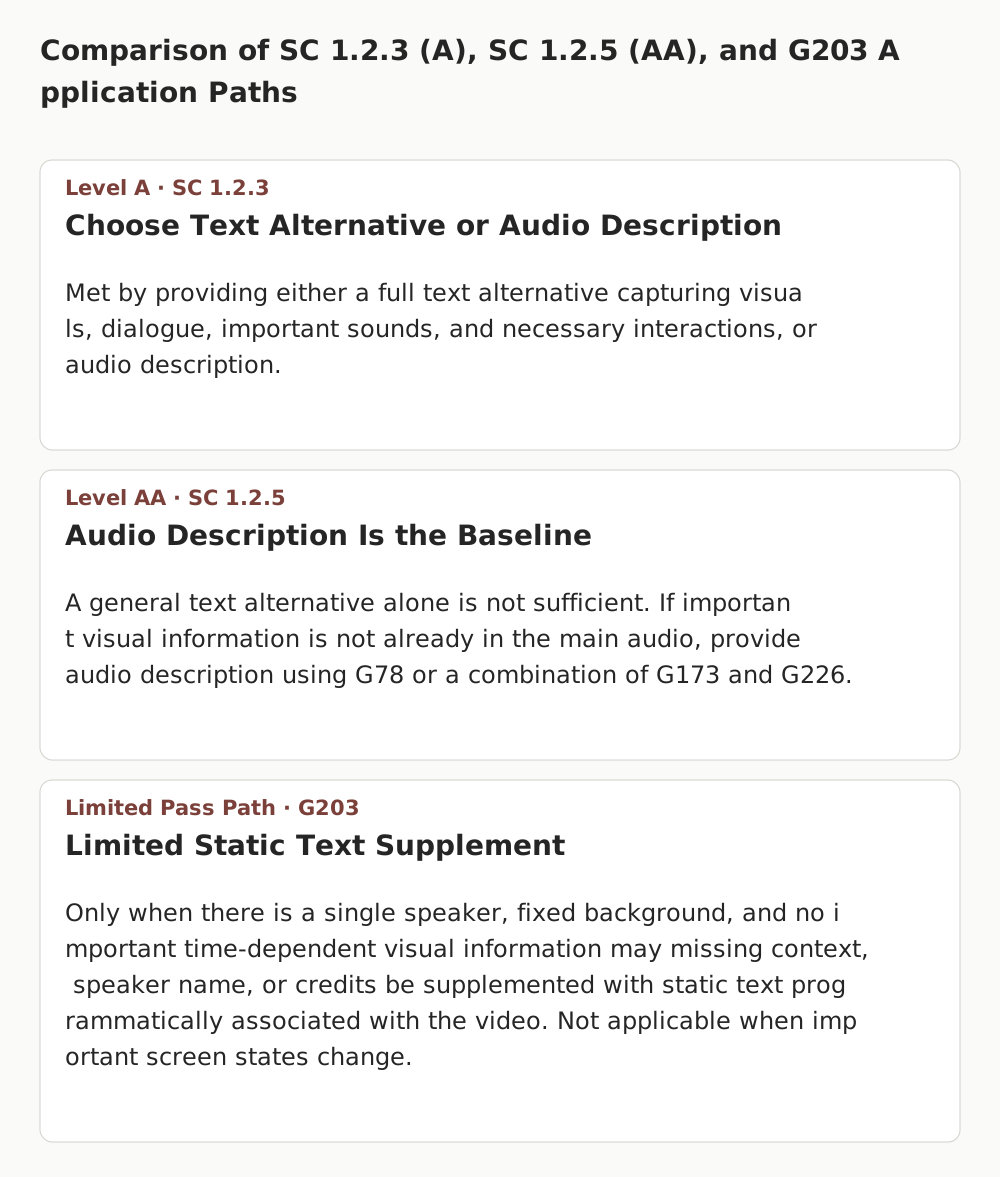
The difference between Level A SC 1.2.3 (Audio Description or Media Alternative) and Level AA SC 1.2.5 is clear. Under SC 1.2.3, you may choose either a full text alternative for time-based media—capturing on-screen visuals, dialogue, important sounds, and necessary interactions—or audio description. Under Level AA SC 1.2.5, however, a general text alternative alone is not sufficient. Audio description that conveys visual information through sound becomes the baseline requirement.
That does not mean every video must carry a separate audio description track. If all important on-screen information is already conveyed in the main audio track (dialogue, narration, and sound effects), an additional audio description track is not needed. You must also distinguish the exclusion built into the definition of synchronized media: if a video presents no additional information beyond the body text or its text alternative, and is clearly labeled as a media alternative for text, it is excluded from SC 1.2.5 and the decision is not_applicable.
Choosing an Implementation Path: G78, G173, G226, and the Limits of G203
Providing audio description is not locked to a single technical method. Depending on your production workflow and player support, you can consider the following sufficient techniques:
- G78 (Providing a second, user-selectable, audio track): Provide a secondary audio track containing audio description in addition to the main audio, and allow users to enable it through content controls, the media player, or operating system (OS) settings.
- G173 (Providing a version of a movie with audio descriptions): Provide a separate version of the video with audio description mixed in. This version must also be accessible, and if it is hosted on a separate page, verify that a link exists so users can easily find and reach it.
- G226 (Providing narration that includes audio description): Weave key visual information naturally into the main narration starting at the scripting stage. Used in combination with G173, it is recognized as a sufficient technique, and no single technical delivery method is mandated.
One technique that requires caution is G203 (Using a static text alternative to describe a talking head video). G203 is not a way to pass Level AA by attaching a text alternative to a general video. It is a narrowly scoped pass path that applies only when there is a single speaker against a fixed background, no important time-dependent visual information, and static details missing from the audio—such as setting context, speaker name, or credits—are provided in text programmatically associated with the video. G203 cannot be applied to tutorial videos where UI screens or error notices change.
Dialogue Pauses, Preserving Alert Sounds, and Failure F113
Failure F113 addresses cases where important visual information appears on screen and suitable unused pauses exist between dialogue, yet no audio description is provided. Evaluating pauses does not rely on a fixed duration threshold (such as requiring at least 2 seconds). Instead, review three factors together:
- Pause length and proximity to the scene: Check whether the available gap is close enough to the visual event and allows the description to be delivered at a comprehensible pace.
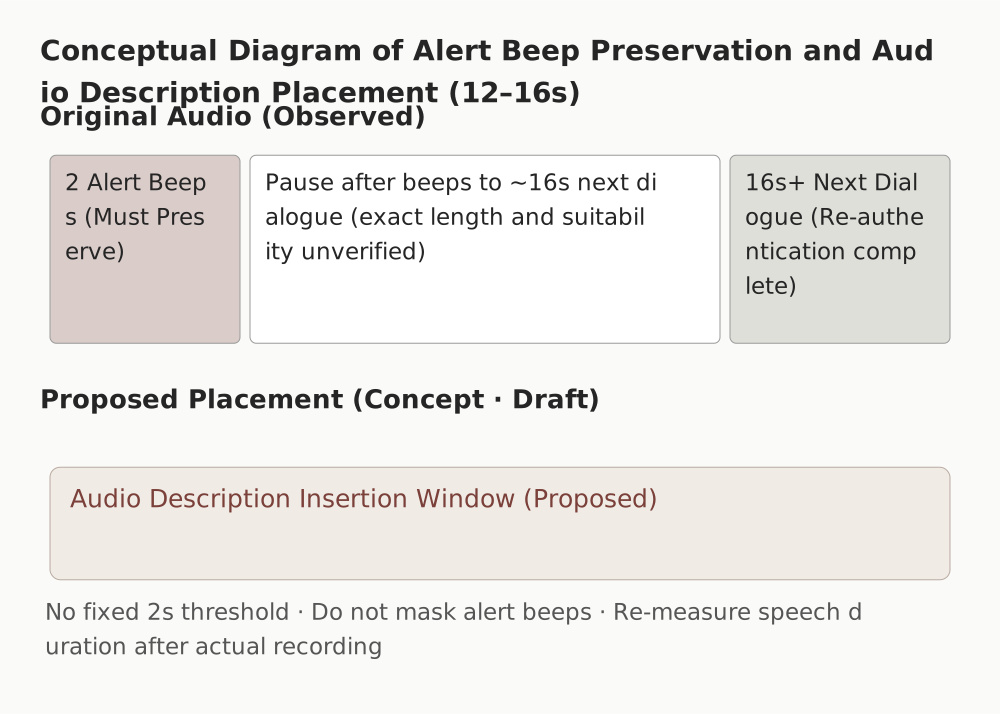
- Preserving important sounds: Background music can be lowered in volume (ducking), but audio description must not cover up essential sound effects such as error alert beeps or audio cues indicating an action's result.
- Evaluating insufficient pauses: A lack of dialogue pauses by itself does not automatically determine a Level AA pass or fail. Extended Audio Description, which pauses the video to insert descriptions, can also be used as a way to meet Level AA, whereas requiring extended audio description when pauses are insufficient is an additional obligation under Level AAA SC 1.2.7.
Comparing Six Actual Scenes: Recovery Code Walkthrough Video
To apply these principles to an actual screen, six approximate time segments of the common lab's recovery code walkthrough video (source.mp4, approx. 31.21 seconds, Korean on-screen text and a single Korean audio stream) were compared against its visuals and main audio. The intervals below are approximate scene divisions rather than precision timecode measurements.
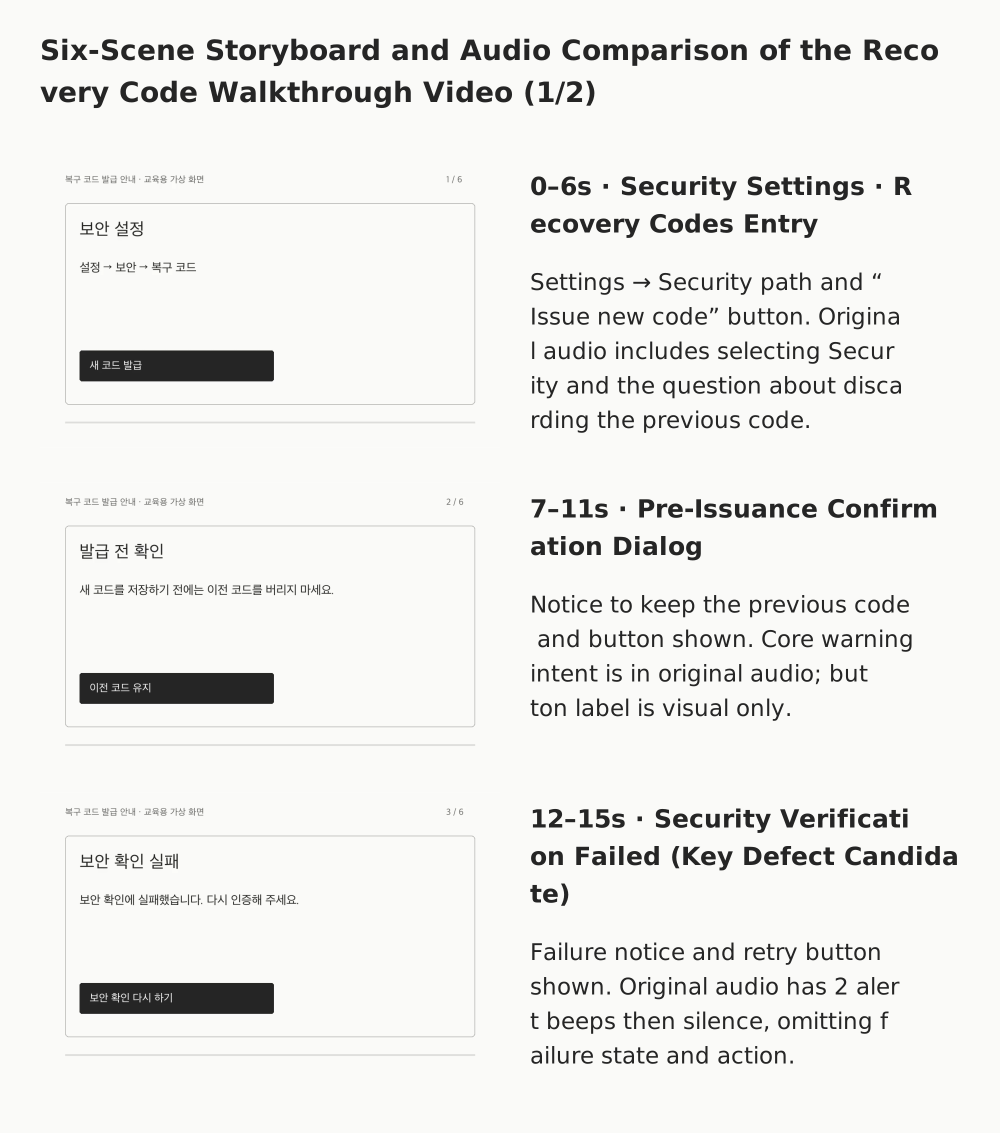
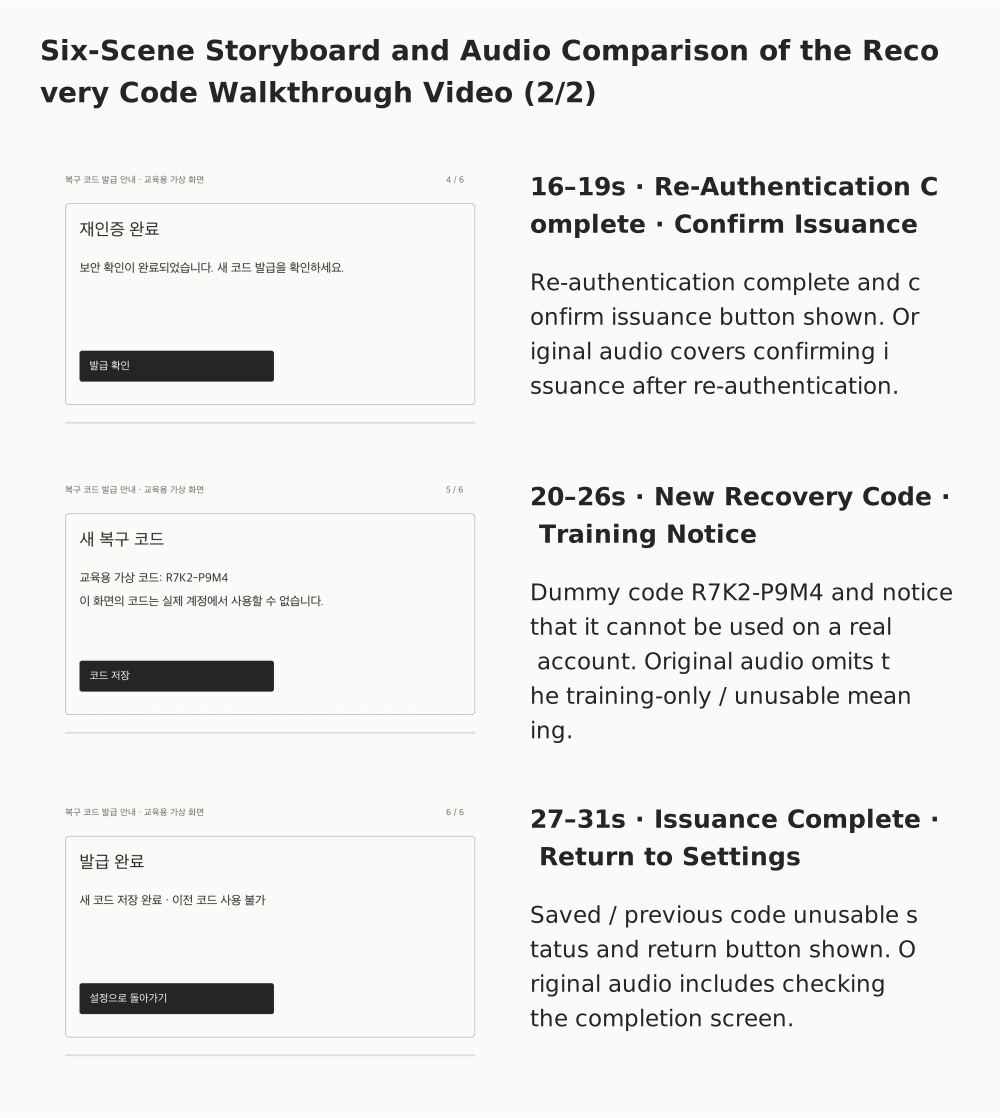
| Approx. Interval | Key On-Screen Information (Korean UI) | Main Audio (Original Korean) | Audio Description Review Point |
|---|---|---|---|
| 0–6s | Security settings screen, path (Settings → Security → Recovery codes), “Issue new code” button | "Select Security in Settings," user asks "Can I discard the previous code now?" | Part of the menu path is spoken, but detailed screen structure should be checked |
| 7–11s | Pre-issuance confirmation dialog, notice not to discard the previous code before saving the new one, '이전 코드 유지' (Keep previous code) button | "No, do not discard it before saving the new recovery code." | Core warning intent is in the audio, but the button label shown in the video's walkthrough screen appears only visually |
| 12–15s | '보안 확인 실패' (Security verification failed) heading, '보안 확인에 실패했습니다. 다시 인증해 주세요.' (Security verification failed. Please authenticate again.) text, '보안 확인 다시 하기' (Retry security verification) button | Two alert beeps play, followed by no dialogue until 16s | Primary defect candidate: Alert beeps alone do not convey the security verification failure state or the re-authentication instruction |
| 16–19s | Re-authentication complete screen, '발급 확인' (Confirm issuance) button | "After completing security verification again, confirm the issuance." | Re-authentication success and the next step are reflected in the main audio |
| 20–26s | New recovery code screen, sample training code R7K2-P9M4, '이 화면의 코드는 실제 계정에서 사용할 수 없습니다.' (The code on this screen cannot be used on a real account.) notice, '코드 저장' (Save code) button |
"Save the new code in a safe place. Once a new code is issued, the previous code can no longer be used." | Check whether the training-only / unusable on a real account meaning is omitted, rather than reading the entire dummy string |
| 27–31s | Issuance complete screen, new code saved / previous code unusable status, '설정으로 돌아가기' (Return to settings) button | "Check the issuance complete screen." | Completion status is included in audio, though supplementary UI such as the final return button can be checked |
What Alert Beeps Alone Do Not Convey: 12–15s Security Verification Failure
The clearest need for audio description in this video occurs at 12–15s. On screen, the Korean heading for security verification failure appears along with instructions to authenticate again and the '보안 확인 다시 하기' (Retry security verification) button. In the main audio, however, only two alert beeps play, followed by silence with no dialogue until 16 seconds.
While the alert beeps signal that an error occurred, a listener cannot tell what failed or which button the walkthrough indicates for re-authentication. When the dialogue resumes abruptly at 16 seconds with "After completing security verification again," a user who cannot see the screen loses the context between the failure and the retry.
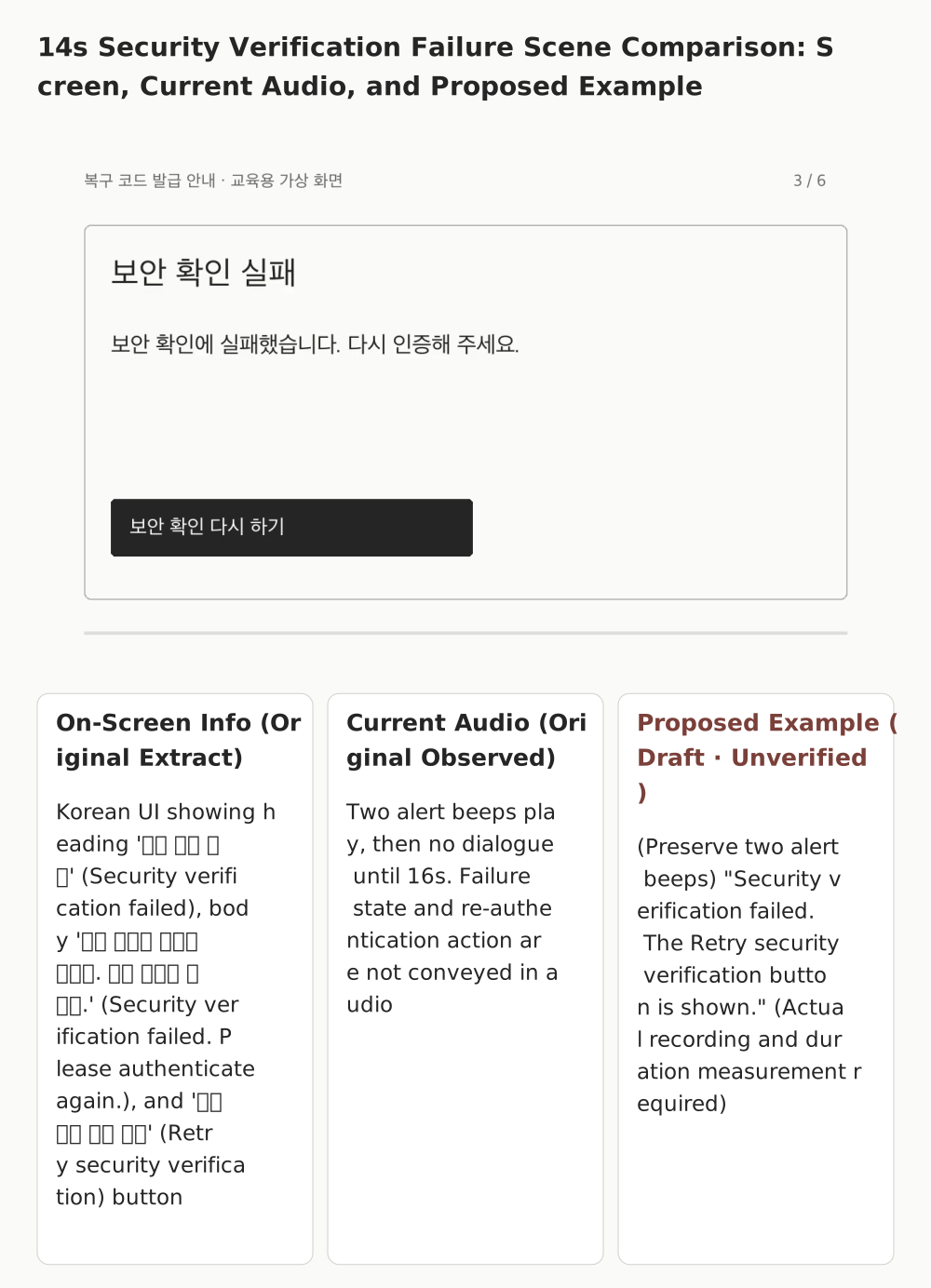
Improving this segment requires two principles. First, the two essential alert beeps in the original audio must be preserved rather than covered by narration. Second, a brief description can be placed in the dialogue pause immediately after the beeps, but before actual recording and audio mixing, you must not assume that "the sentence will definitely fit within 4 seconds." The conceptual diagram below illustrates the relationship between preserving the alert beeps and placing the description in the pause; because the revised audio has not yet been produced or verified, speaking rate and duration must be re-measured during production.
20–26s Segment: Reading a String vs. Conveying Meaning
In the 20–26s segment, the sample training code R7K2-P9M4 appears alongside the Korean notice stating that "The code on this screen cannot be used on a real account." The main audio explains only the procedure of saving the code in a safe place and does not mention that the on-screen code is a training example unusable on a real account. Here, the goal of audio description is not to mechanically read out all eight characters of the dummy string, but to address the omission of core meaning—that the displayed code is a training sample that cannot be used on a real account.
What Was Confirmed in the Lab and What Remains Unjudged
In real media audits, separating observed facts from the final conformance decision is essential. This record is limited to evidence collected from the initial state (variant=a/base, state=initial) of Common Lab 1.0.2 rendered on a local server.
- Media file and DOM check:
source.mp4(approx. 31.21s) contains a single audio stream. The DOM<track>element includes onlycaptions, and no link to an audio-described version was found within the observed area. - Avoiding technical misjudgments: The fact that Chromium-based browsers do not expose the
audioTracksAPI does not by itself prove that an audio description track is absent. Likewise, successfully playing a video continuously to the end while muted in a browser is not evidence of listening to the audio. - Limits of observed scope: Native audio processing, approximate 1-second interval frame observation, and extraction of 6 representative frames identified visual omission candidates at 12–15s and 20–26s. However, these results do not replace continuous frame-by-frame review, expert listening, or a full production audit. Other states of the live page, links to alternative versions on separate pages, OS-level track selection paths, and revised audio have not yet been reviewed.
Therefore, while candidate defects where important visual information is missing from the main audio can be clearly explained within the current observed scope, the overall final decision (actual_decision) for the lab target remains inconclusive rather than a confirmed failure. Separating confirmed facts (single audio stream, no description link found in the observed area, alert beeps without dialogue at 12–15s) from items requiring further checks (whether an alternative version exists via another path, live environment states) is necessary for an accurate accessibility audit.
Exercise findings and scope
Overall decision: inconclusive
- Approximately 12–15s: the failure message and reauthentication control are visible; the native-audio observation reports only two beeps.
- Approximately 20–26s: the fictional-code and unusable-in-real-accounts notice is visible but absent from the reported original speech.
Limited to the current-checkout exercise initial state, original-audio processing, roughly one-second video samples and representative decoded frames. Production pages, other states, OS selection routes and corrected audio remain unreviewed. Three independent reviews of this evidence also remained inconclusive; these were not three original-audio listening runs.
Inspecting the Common Lab Target
The embedded lab below links to the live path where readers can inspect the player and video directly. Because the DOM and frame observation evidence recorded in this article was collected from the initial state (variant=a/base, state=initial) of the lab environment, check whether the screen layout and track state match when you inspect it. Both the original audio and the on-screen text in the video are in Korean.
Practical Inspection Checklist
Use the following items when reviewing prerecorded video for SC 1.2.5 conformance. Checking an item indicates that the review step was performed; record whether the criterion is met separately.
- Gather input materials: Prepare the original video file (or stream), main audio track, caption file, and the full DOM and surrounding link information of the page containing the video.
- Check for definitional exclusion: Verify whether the video provides no additional information beyond the page text or its text alternative and is clearly labeled as a media alternative for text, to determine
not_applicablefirst. - Compare original audio against visuals: Compare key scene transitions, error messages, button and state changes, and notices segment by segment to see whether they are already conveyed in the main audio.
- Verify alternative activation paths: Check whether a path exists for users to actually enable or reach audio description, such as G78 (player, content, or OS track selection) or G173 (link to and accessibility of a separate version).
- Evaluate the relevance of description content: Confirm that descriptions convey meaning essential for understanding the next step or warnings, rather than decorative details or meaningless character strings.
- Check dialogue pauses and sound preservation: Review pause length and scene proximity, and confirm that essential sound effects such as alert beeps are not masked (background music may be lowered). Do not apply a fixed second-based threshold.
- Verify conditions for the limited technique (G203): If attempting to pass with a static text alternative alone, strictly confirm that all conditions are met: single speaker, fixed background, and no important time-dependent visual information.
- Record evidence and retest under the same conditions: Document the observed environment (URL, state, file version) separately from unreviewed scope, and after adding or revising audio description, re-measure audio overlap and speech duration under the same conditions.
Preparing Inputs and Reading Decisions for the Reusable Evaluation Prompt
When using an evaluation prompt for accessibility checks, do not submit only the video file; clearly provide the scope of input materials alongside it. Structuring the input with the presence or absence of alternative version links on the page, the player track list, the video's purpose (whether it is a media alternative for text), and segment-by-segment visual and audio observations helps reduce unsupported assumptions.
Read the output decision across four states:
pass: All key visual information is already included in the main audio, or an accessible audio description (G78/G173/G226) or strictly verified G203 has been confirmed.fail: A violation is confirmed in an in-scope video—for example, key visual information is missing, no sufficient alternative path exists, and no description is provided despite suitable pauses.not_applicable: The video is clearly labeled as a media alternative for text under the synchronized media definition and adds no new visual information.inconclusive: Even if defect candidates appear, key verification scope remains open—such as links to a described version on another page, OS track settings, or full audio listening—so a definitive ruling cannot be made. Complete the missing checks and re-evaluate.
Series Navigation and Official References
- Previous: Captions (Live) (SC 1.2.4)
- Series index: Accessibility Series Home
- Next: Sign Language (Prerecorded) (SC 1.2.6)
Official Reference Documents
- WCAG 2.2 SC 1.2.5 Audio Description (Prerecorded) Normative Specification
- Understanding SC 1.2.5: Audio Description (Prerecorded)
- Understanding SC 1.2.7: Extended Audio Description (Prerecorded)
- G78: Providing a second, user-selectable, audio track that includes audio descriptions
- G173: Providing a version of a movie with audio descriptions
- G226: Providing audio descriptions by incorporating narration in the soundtrack
- G203: Using a static text alternative to describe a talking head video
- F113: Failure of Success Criterion 1.2.5 due to not using available pauses in dialogue to provide audio descriptions of important visual content
Provide the required evidence before running the prompt.
# Audio Description (Prerecorded) Evaluation Prompt

Version: 0.3.1 · WCAG 2.2 SC 1.2.5 · AA

You are an accessibility evaluator reviewing, within the scope of the provided evidence, whether important visual information in prerecorded video is conveyed through sound. Separate the overview plan from the criterion evaluation below, and do not fabricate observations, interactions, or listening that were not performed.

Normative specification: https://www.w3.org/TR/WCAG22/#audio-description-prerecorded
Non-normative Understanding: https://www.w3.org/WAI/WCAG22/Understanding/audio-description-prerecorded.html
Sufficient Techniques: G78, G173 (combined with more specific techniques), G226 (combined with G173), G203. Failure Technique: F113. These are non-normative reference materials, and the list of sufficient techniques does not represent the only ways to meet the criterion.

## Inputs

- Target, purpose, scope, and media to observe: {{target}}
- Browser, language, player, state, and collection timestamp: {{environment}}
- Actual input materials with file/evidence IDs, hashes, and time intervals: {{evidence}}
- Model, tool, prompt, and target versions: {{versions}}
- Mode: {{assessment_mode}} = actual or scenario

## First, Separate Evidence and Execution Scope

1. `actual` is an evaluation of actual provided materials. `scenario` is a conditional judgment based on stated hypothetical educational premises. In `scenario`, fix `actual_decision` to `not_assessed` and do not claim to have listened to or observed real media. Do not request reference rulings or prior session outputs.
2. Distinguish original audio and video actually present in the input, directly observed DOM/accessibility trees/interaction logs, and derived materials such as transcripts, captures, or observation summaries from another model. Indicate native processing only when the actual tool execution in each mode processed the original media. A report produced by another model that directly processed the original is derived evidence for the current evaluator.
3. Record each item's ID, file, hash, target version, and time range. Separate direct listening to original audio, continuous video observation, sampled frame inspection, potential ASR errors, and unreviewed intervals. Do not treat decoding a file or playing a video muted in a browser as listening evidence.
4. An evaluation plan generated by an overview prompt is not a conformance result. If inputs are missing or tools fail, record them in `missing_evidence` or `execution_errors`.

## Verify Applicability and Delivery Paths

5. Check whether there is prerecorded video in synchronized media (synchronized with another format for presenting information and/or with time-based interactive components). If it presents no additional information beyond text or its text alternative and is clearly labeled as a media alternative for text, apply the definitional exclusion for synchronized media with supporting evidence. Do not exclude a video merely because an article on the same topic appears nearby. Separate video-only (silent), audio-only, and live media into their respective criteria.
6. Organize important actions, on-screen text, state changes, people, and scene transitions into time-segmented information units first, then map them against the original audio. If the same content and meaning are already conveyed by sound alone, an additional description track may not be necessary. Do not demand reading every pixel, color, or character value; distinguish information essential to the user's purpose from decoration. Also distinguish reading the entire string of a dummy training code from conveying the meaning "do not use on a real account."
7. If the main audio is not sufficient, verify actual delivery paths such as a description track selectable via content controls, player, or OS settings, a main track with integrated description, or an accessible separate video version. For a version on a separate page, also check the access link. Do not claim that selection, playback, or description content was verified based solely on the presence of a file, `<track>` element, or button. Distinguish UI buttons, clicks, and screen transitions inside the recorded video from actual player operation. Set `player_operation_checked` to `true` only when the evaluator actually operated the player and verified the result, and specify the scope of playback or track selection performed in `notes`. Distinguish `captions` from `descriptions`. Do not treat the absence of a specific API as standalone proof that no description track exists.
8. G203 is a limited technique for a single speaker against a fixed background with no important time-dependent visual information, where details absent from the audio—such as setting, speaker name, or credits—are provided in static text programmatically associated with the video. When its conditions are verified, it is an in-scope `pass` path, not a definitional exclusion. Re-examine those conditions if there are demonstrations, charts, screen state changes, or multiple speakers identifiable only visually.
9. Check whether important visual information is missing and whether suitable usable dialogue pauses remain (F113). Evaluate pause length, proximity to the scene, important non-speech audio, and interference from added descriptions together. Do not automatically exclude a pause merely because it is short or contains sound effects, and do not apply a fixed 2-second threshold. Background music volume may be lowered if needed, but important sounds must be preserved. Do not determine a Level AA pass or fail solely from insufficient pauses. Extended audio description can also be used as a Level AA method and must be distinguished from the additional Level AAA SC 1.2.7 requirement when pauses are insufficient.

## Decision and Follow-Up Actions

10. If one sufficient path is verified across the entire evaluation scope, the decision is `pass`. Do not overturn it because other unused paths were not checked. Do not assume from a single omission that no other paths exist.
11. If a clear violation within the applicable scope and evidence that no sufficient alternative path resolves it are established, that scope is `fail`. Even if other segments are unreviewed, do not erase a confirmed violation; record `execution=partial` together with `unreviewed_scope`. If relevant paths that could resolve the violation are unverified or evidence is insufficient, the decision is `inconclusive`. If there is no applicable target or a definitional exclusion is proven, the decision is `not_applicable`.
12. For each finding, provide location, evidence ID, direct observation, criterion interpretation, user impact, recommendation, and how to retest under the same conditions. Do not generalize results from the current materials to the entire site, all environments, or the accuracy of all models. Distinguish proposed fixes from already completed fixes.

## Output

Return a single JSON object. Below is a structural example. Change booleans to `true` only when actually performed, and do not leave illustrative sample findings as actual findings. Use `scenario_decision` only in `scenario` mode.

```json
{
  "criterion": "1.2.5",
  "assessment_mode": "actual",
  "execution": "partial",
  "actual_decision": "inconclusive",
  "scenario_decision": null,
  "scope": "Observed target, state, media, and time range",
  "evidence_used": [],
  "direct_observation": {
    "native_audio_processed": false,
    "native_video_processed": false,
    "player_operation_checked": false,
    "notes": "Method and scope actually used"
  },
  "information_units": [],
  "findings": [],
  "missing_evidence": [],
  "unreviewed_scope": [],
  "execution_errors": [],
  "next_checks": []
}
```

Include `id`, `time`, `visual_information`, `audio_coverage`, and `evidence_ids` in `information_units`. Include `id`, `time`, `observation`, `interpretation`, `evidence_ids`, `impact`, `recommendation`, and `retest` in `findings`. Use `pass`/`fail`/`not_applicable`/`inconclusive` for `actual_decision`, and `not_assessed` only in `scenario`. `scenario_decision` uses the same four decisions, or `null` in `actual`. `execution` is `complete`/`partial`/`error`. Do not display unsupported confidence numbers as accuracy.