Suppose you have built a sign-up screen. Users enter an email address and password, agree to the terms, and select the sign-up button. Everything may seem fine when using a mouse. But if users open the terms with a keyboard and cannot move to the close button, completing sign-up becomes difficult. If input errors are indicated only by a red border, people who have difficulty distinguishing colors may not know what to correct.
This example is a hypothetical situation used to explain accessibility, not the result of testing a particular service. The starting point for learning web accessibility is to examine whether users can obtain information and complete the tasks they need to perform in situations like this. Understanding the criteria helps you explain why a problem occurs, and designing an evaluation method lets you verify the results of a correction.
In this series, we will learn that process using WCAG and AI together. Each article will explain the user needs that a criterion is intended to protect, analyze implementation examples, and provide the materials and prompts needed for evaluation. This first article outlines the overall learning path and how to begin an evaluation.
Designing for Users to Obtain Information and Use Functionality
W3C’s introduction to web accessibility describes designing websites and tools so that people with disabilities can perceive and understand information on the web, and navigate and interact with it. This includes a range of access needs related not only to vision and hearing, but also to physical, cognitive, and learning disabilities. W3C’s Introduction to Web Accessibility
Users interact with the same screen in different ways. They may navigate headings and input fields with a screen reader, or magnify the screen and view only part of it. They may use a keyboard or another input device instead of a mouse, or understand the audio in a video through captions. Design and implementation must convey information and functionality through these ways of using the service as well.
Features designed with accessibility in mind also help when a hand injury makes using a mouse difficult, or in an environment where audio cannot be heard. However, explaining accessibility only through these additional benefits obscures the conditions that people with disabilities need to use a service. This series bases its judgments on users’ access needs and the tasks they are actually trying to perform.
In the sign-up screen described earlier, the evaluation covers the process of reading instructions, understanding the purpose of fields, reviewing the terms, correcting errors, and completing sign-up. Checking only that the terms popup opens is not enough. You also need to examine whether users can move into the popup, review its content, close it, and continue entering information.
Reading WCAG as a Shared Basis for Implementation and Evaluation
WCAG stands for Web Content Accessibility Guidelines. This series uses WCAG 2.2, a W3C Recommendation, as its standard. The abbreviation a11y, meaning accessibility, replaces the 11 letters between the first letter, a, and the last letter, y, of accessibility with a number.
Learning WCAG’s four principles makes it easier to understand why individual requirements are needed. The questions and sign-up screen examples below explain how to connect each principle to practical work. W3C’s Accessibility Principles
| Principle | Questions to Ask During Design | Examples to Examine on a Sign-up Screen |
|---|---|---|
| Perceivable | Is necessary information provided in a form that users can perceive? | Are errors described in text as well as indicated by color? |
| Operable | Can users operate functionality with their input methods? | Can users open and close the terms with a keyboard and then continue signing up? |
| Understandable | Can users understand the information and operating methods, and anticipate the results? | Are password requirements and instructions for correcting errors specific? |
| Robust | Can browsers and assistive technologies interpret the meaning and state of elements? | Are the names and error states of input fields conveyed programmatically? |
Under each principle are guidelines and success criteria. For example, 1.1.1 is the success criterion concerning text alternatives for non-text content. When making an actual determination, you must read the conditions of applicability and the exceptions. The Understanding documents explain intent and examples, while the Techniques documents are useful references for implementation methods. Implementations that meet a criterion are not limited to any one specific example. WCAG 2.2 Standard
Success criteria are assigned levels A, AA, or AAA. Level AA conformance requires meeting both A and AA requirements, and level AAA conformance includes the requirements of all three levels. Interpreting these levels as rankings of implementation difficulty or problem severity can lead to incorrect priorities. W3C does not recommend requiring full AAA conformance as a general policy for all sites, because some content cannot satisfy every AAA criterion. W3C’s Understanding Conformance
WCAG 2.2 has 86 current success criteria: 31 at level A, 24 at level AA, and 31 at level AAA. This series plans to cover each in one article with one prompt. 4.1.1 Parsing, which was removed in WCAG 2.2, will not be included in current evaluations. WCAG 2.2 Standard, What’s New in WCAG 2.2
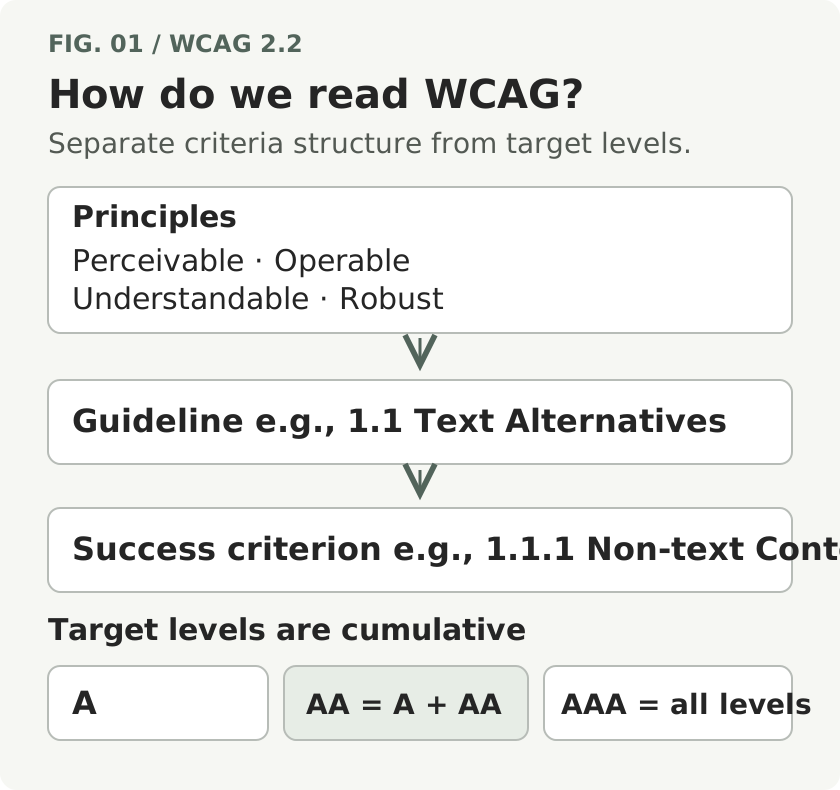
If you are designing an evaluation for the first time, we suggest setting WCAG 2.2 AA as a provisional working target, then reviewing additional criteria needed for the service’s users and content. This is a practical recommendation from this series. This article alone cannot establish the target level for a particular project.
Including Screen States and Complete User Processes in the Evaluation Scope
A sign-up page has multiple states even at a single URL. The initial visit, the display of password requirements, an open terms popup, an error, and completed sign-up are different states. The layout may also change on mobile or magnified screens.
An evaluation therefore needs to record the state, sequence of interactions, and execution environment along with the URL. Results from checking the initially displayed screen apply to the scope examined at that time. They cannot be interpreted as confirmation that screens after login or error handling were also checked.
WCAG’s conformance requirements also address full pages and complete processes. In a sign-up or purchasing process that spans multiple pages, the pages needed for that process must meet the target level. A score calculated by adding up the results of checks on some elements is not sufficient to declare that process conformant. WCAG Conformance Requirements
For a large site, you can select representative pages and states for evaluation. W3C’s WCAG-EM 2.0 describes the steps of defining the scope, exploring the target, selecting a representative sample, evaluating, and reporting results. The scope of a sample evaluation must be recorded separately from claims about the entire site. WCAG-EM 2.0 Evaluation Methodology
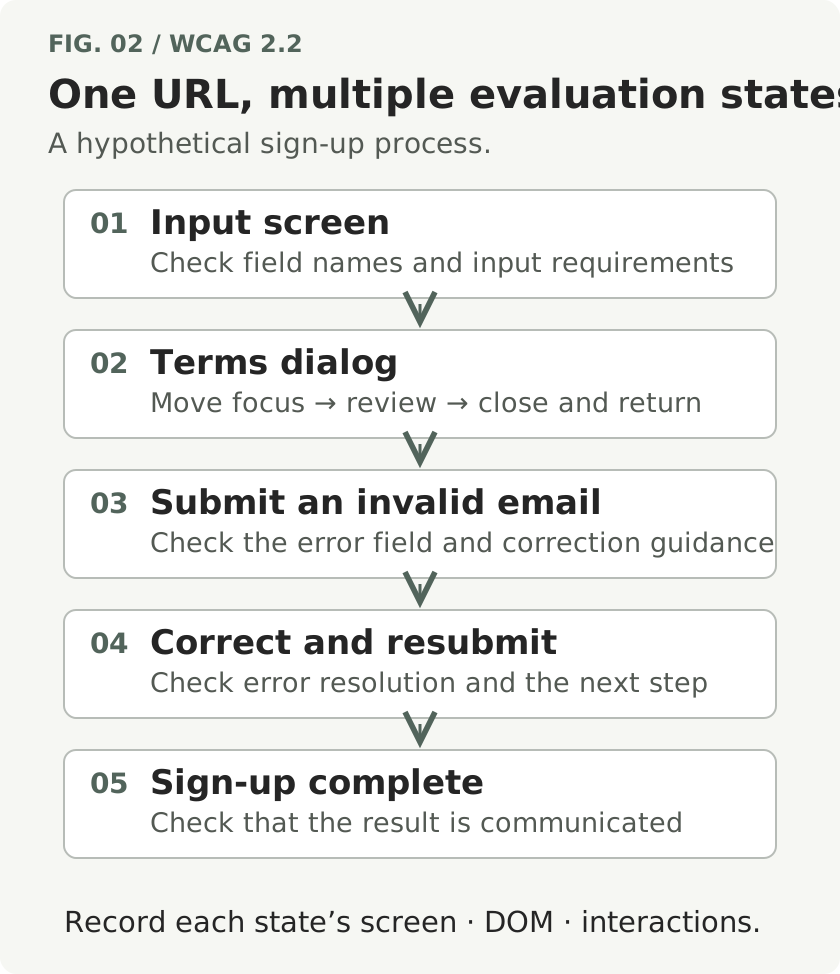
If you start with a sign-up screen, you can divide the states as follows. The table below is an example evaluation plan; it does not mean that actual problems have been found.
| State | What to Check | Examples of Evidence to Prepare |
|---|---|---|
| Initial visit | Can users find the purpose and requirements of input fields? | Rendered DOM, screen, accessibility tree |
| Terms popup open | Can users operate the popup and return to the input screen? | Keyboard interaction sequence, focus records, screens for each state |
| Invalid email submitted | Can users identify the field with an error and how to correct it? | DOM in the error state, guidance text, assistive technology output |
| Input corrected and resubmitted | Is the error resolved, and does the process move to the next step? | States before and after correction, and interaction records |
| Sign-up complete | Can users perceive the outcome? | Completion screen, state-change records, output from any assistive technology needed |
Starting with a core user process makes it easier to explain how problems affect task completion. After evaluating the first process selected, expand the scope to other functions and shared components. Do not record a pass for this process as completion of the entire site’s evaluation.
Expanding the Scope of Meaning and Behavior Evaluation with Multimodal AI
Accessibility tools identify problems that can be checked quickly using predefined rules. The scope of a check and the meaning of its results depend on the rules implemented by the tool, the input materials, and the state in which it was run. W3C explains that evaluation tools alone cannot automatically determine every aspect of accessibility, and that their results may be inaccurate. The Role and Selection of Accessibility Evaluation Tools
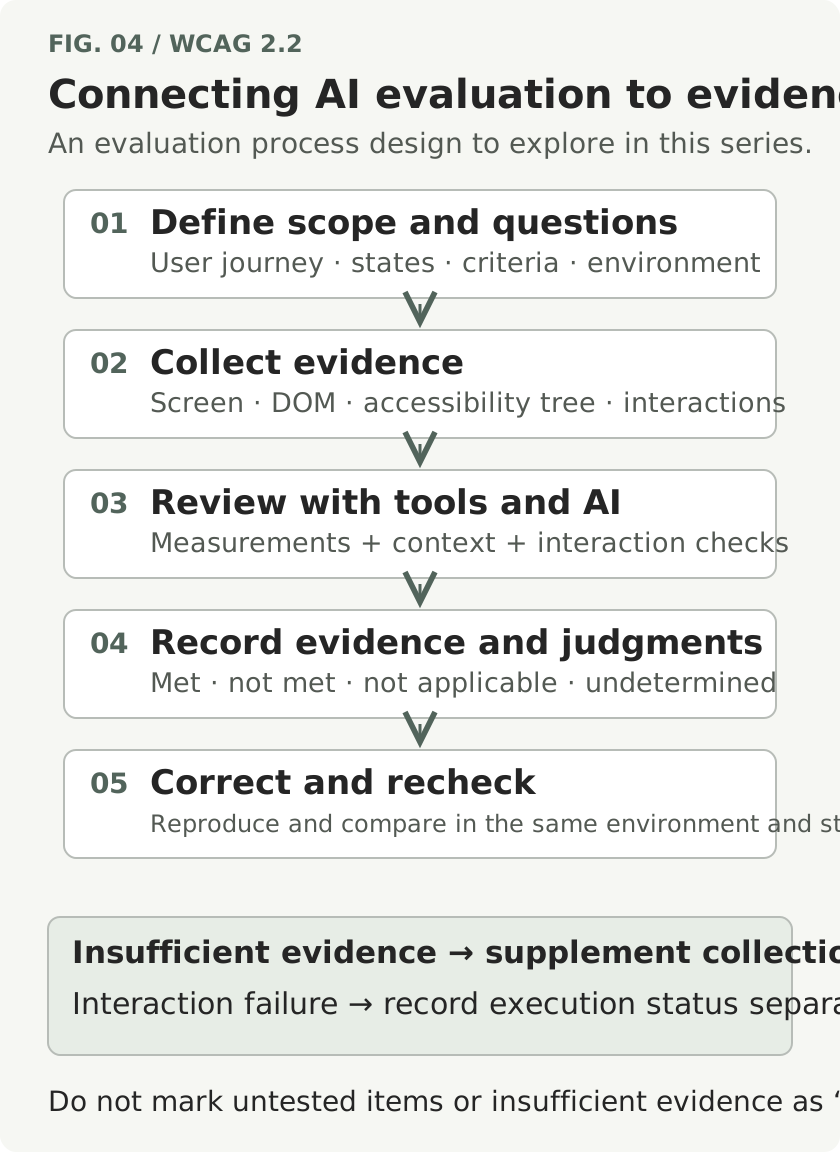
This series explores ways to use AI to evaluate meaning, context, and interaction that have been difficult to address with existing rule-based checks. Providing the necessary materials to a multimodal model that processes text and images together, and connecting browser interaction tools, expands the range of observations available for evaluation. The direction of this series is to design and validate collection methods and judgment procedures for each criterion.
Consider text alternatives. The fact that an image has an alt attribute is different from a judgment that its content appropriately conveys the image’s purpose. Even for the same image of a delivery truck, the alternative information needed changes depending on whether it decorates delivery instructions or serves as a link to a shipment-tracking function. W3C’s alt decision tree also guides the choice according to the image’s function and context. An alt Decision Tree
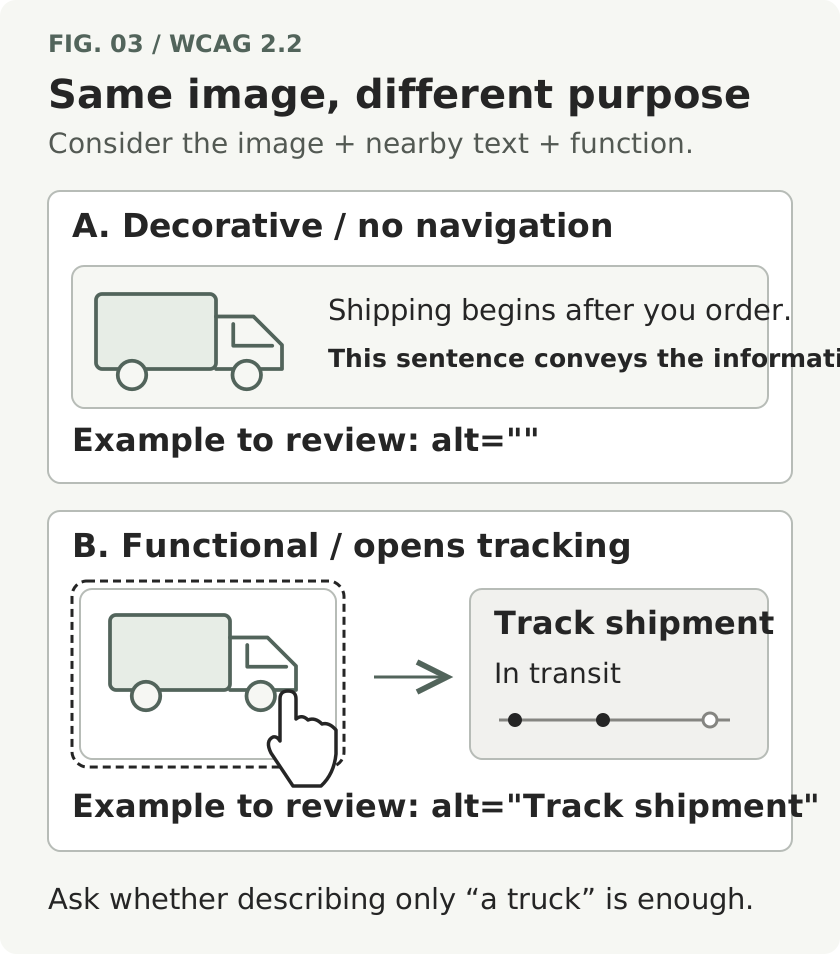
You can provide AI with not only the image and its alternative text, but also surrounding text, whether it is a link, its destination, and other information. The evaluation question is designed to have the model examine whether the necessary information is conveyed in that location, rather than merely describe the image’s appearance. How accurately it actually makes these judgments must be validated by collecting examples.
The evidence collected differs further when evaluating behavior. A screenshot of the terms popup can help you examine its layout and some visual states, but determining where keyboard focus moved requires actual interaction and records. Nor can you determine from the screen alone whether an error is conveyed to a screen reader. You must collect the observations needed for that judgment, such as the output of the assistive technology used.
Distinguishing between missing materials and an AI failure to make a judgment clarifies the next task. If no focus records were received, add a collection step. If judgments are inconsistent despite the necessary records being available, review the input structure, interpretation of the criterion, prompt, and model performance. In this way, the evaluation scope can be expanded incrementally.
The roles of numerical measurement and semantic judgment also need to be defined. When evaluating contrast, for example, it is easier to verify results if tools are used to check the screen’s colors and the conditions needed for calculation, and the measurements are then provided to the model, rather than asking it to guess values from the screen. An agent can be designed to navigate to the necessary state, run a measurement tool, and connect the results to the relevant criterion.
Possibilities and Conditions Indicated by Recent AI Evaluation Research
The study Towards Scalable Web Accessibility Audit with MLLMs as Copilots, released in 2025, proposes a structure that uses multimodal models for page sampling and accessibility auditing. It is an example of research extending the use of AI from judgments about individual screens to the evaluation process. Original Study
The preprint Agentic Web Accessibility Auditing, released in September 2026, addresses a method in which agents given criterion-specific instructions investigate pages and run tools. The researchers evaluated it using 250 page–criterion records drawn from 24 pages on 11 scholarly platforms. Of the 78 page–criterion records with reported issues, the agents identified 67, yielding 86% recall. Precision—the proportion of records judged to have issues that agreed with the reference answers—was 56%. Original Study and Evaluation Scope
These figures are results under the conditions of that study. Although agents were implemented for 40 criteria, only 15 criteria included issue examples, and records not mentioned as issues in the reports were assumed to be cases without issues. The behavior of saved pages may differ from that of the live services, and exposure to the evaluation pages during development also limits generalization. The 86% figure therefore cannot be used as a detection rate for all websites.
For evaluation design in this series, we suggest preparing cases that meet the requirements, cases with issues, and borderline cases for each criterion. Along with the number of issues found, check false positives, missed issues, deferred judgments, and consistency across repeated runs, and record the effort needed to reproduce the results. Improvements to prompts will be assessed using the evidence collected in this way.
First Exercise: Creating an Evaluation Plan for One User Process
For the first article’s exercise, choose one frequently used process in your service. It can be a process such as requesting materials, signing up, or searching for products, as long as you can describe its start and completion conditions. Also record whether a tool capable of opening URLs is connected, and whether login or a test environment is required. Simply including a URL in a prompt does not mean that every model can visit or interact with the page.
Checking the items below means that you have reviewed the preparations. It does not indicate that accessibility criteria have been passed.
- I have recorded what the user wants to do and the completion conditions. Example: Review the terms, sign up, and perceive the completion message.
- I have listed the starting screen and the error, popup, and completion states. States not yet checked remain marked as unverified.
- I have recorded the target WCAG version and level, and the evaluation environment, including browser, screen size, input method, and assistive technology. I have also marked any conditions not yet decided.
- I have distinguished the materials to provide from the connected tools. I have removed personal information and authentication information, and recorded the capture time and state together.
Enter these materials into the Overview Evaluation Planning Prompt to request an outline of the user process, necessary evidence, collection sequence, and unverified points. If you do not yet have materials from actual execution, the output must also be read as an evaluation plan.
For example, an output saying “The error needs to be checked with a screen reader” is a follow-up task. A judgment saying “The error is not conveyed” requires an observed state and actual output. When reviewing results, examine the original materials referenced by the evidence as well as the model’s explanation.
After carrying out the evaluation, use a method that records execution and judgment separately. Record failures in material collection or interaction as execution statuses, and record criterion results as met, not met, not applicable, judgment deferred, or similar categories. Treating an unexecuted check as met, or treating an item as not applicable without verifying its applicability, makes it difficult to understand the evaluation scope.
When a problem is confirmed, first record its impact on users and the steps to reproduce it. You can prioritize corrections according to whether the problem prevents sign-up, makes instructions difficult to understand, or affects a shared component repeated across multiple screens. After improvements, recheck in the same environment and state, and examine whether the changes have caused problems in other behavior.
Connecting Criterion-by-Criterion Learning to a Reusable Evaluation Process
Starting with the next article, we will cover the WCAG 2.2 success criteria one by one. Each article will begin with the user situations that make the criterion necessary, and explain its conditions of applicability, exceptions, and implementation examples. It will then connect the materials and prompts to provide to AI, how to read the evidence supporting its output, and what to check after improvements.
The full table of contents will be organized for navigation by the four principles and criterion numbers. You can read from the beginning in order, or start with articles relevant to the user process you selected earlier. If you set AA as your working target, review A and AA criteria together; in the AAA articles, you can examine additional requirements to apply to your service.
At the end of the series, we plan to address an agent architecture that connects criterion-specific evaluations to define scope, collect evidence, report results, and recheck improvements. Prompts and validation methods will also be updated in response to examples and research. In each article, we will distinguish illustrative examples from actual evaluation results, and record the environment and scope in which validation was performed.
User experience should be examined alongside evaluation against the criteria. W3C explains that involving users with disabilities in evaluation helps identify usability problems that checks against criteria alone may not reveal adequately. You cannot record AI responses simulating a user perspective as a replacement for that participation. Involving Users in Evaluating Web Accessibility
What you need to prepare at the first stage is one user process to evaluate and materials for observing that process. In the next article, we will begin with 1.1.1, the non-text content criterion, to examine what alternatives should be provided for the information conveyed by images.
References
Date standards and research materials were checked: October 1, 2026. The research results below are those reported by the researchers, not results from running this series’ prompts.
- W3C — Introduction to Web Accessibility: Who accessibility serves and different ways of using the web.
- W3C — Accessibility Principles: The four principles and key requirements.
- W3C — WCAG 2.2: The canonical specification of success criteria and conformance requirements.
- W3C — Understanding Conformance: An explanation of levels and conformance.
- W3C — What's New in WCAG 2.2: Added criteria and the removal of 4.1.1.
- W3C — WCAG-EM 2.0, 2026-07-23 Group Note: Evaluation scope, representative samples, and reporting procedures.
- W3C — Selecting Web Accessibility Evaluation Tools: The scope of tool-based checks and interpretation of results.
- W3C — An alt Decision Tree: Choosing alternative text according to function and context.
- Gu et al. — Towards Scalable Web Accessibility Audit with MLLMs as Copilots, 2025-11-05: Research on audit support using multimodal models.
- Mishra et al. — Agentic Web Accessibility Auditing, 2026-09-10 v2, preprint: Criterion-specific agents, experimental results, and limitations.
- W3C — Involving Users in Evaluating Web Accessibility: Combining user participation with evaluation against criteria.
Provide the required evidence before running the prompt.
You are a consultant designing a web accessibility evaluation plan.
The purpose of this task is to define the evaluation scope and evidence collection plan for one user process.
Do not make accessibility judgments before actually reviewing the materials or performing interactions.

[Input — Fill in only what you know, and mark unknown conditions as 'undecided']
Service description:
What the user wants to do:
Completion conditions:
Target URL and test environment:
Target standard and level: WCAG 2.2 / level undecided or A·AA·AAA
Evaluation environment: Browser, screen size, magnification settings, input method, assistive technology
Known states: Initial, popup, error, completion, etc.
Provided materials: DOM, screenshots, accessibility tree, interaction records, audio/video, etc.
Connected tools and actual permissions: Opening URLs, keyboard input, capture, measurement, etc.
Permitted interactions: Scope of test data use and whether submission is permitted
Identifiers, collection times, and corresponding states for each material:

[Writing Principles]
1. Distinguish provided facts, assumptions made by the evaluator, and information not yet verified.
2. Do not state that visiting, logging in, interacting, or observing has been completed merely because a URL is available.
   This request is for writing a plan. Do not perform actual interactions such as submitting forms.
3. Select criteria according to the target level entered by the user. AA includes A and AA.
   Do not include 4.1.1 Parsing, which was removed in WCAG 2.2, in the evaluation.
   If you cannot verify the criterion’s original text or conditions of applicability, mark it as 'original text needs verification'.
4. Do not assign entire criteria to fixed categories of rule-based checks, meaning/context evaluation, or actual interaction.
   Even within the same criterion, the methods and evidence needed may differ according to the check question and state.
5. Do not determine focus movement or screen reader output from screenshots alone.
   Explain why the observations are insufficient and what additional materials need to be collected.
6. Advise against submitting materials that contain personal information or authentication information.

[Output]
A. Evaluation scope: The selected user process, start and completion conditions, included and excluded scope,
   target version and level, and undecided execution environment. Also indicate how this differs from an evaluation of the entire site.
B. State and evidence planning table:
   State ID | Entry and exit conditions | User task | Candidate WCAG criteria and reasons for applicability |
   Required evidence and tools | Materials already provided | Additional collection | How to verify completion
   Distinguish planned states from states actually observed.
C. Recommended execution sequence: Connect restoration of necessary states, material collection, rule-based checks and meaning evaluation,
   review of interaction records, and reevaluation after review and correction.
   Leave tasks for which tools are unavailable or that exceed the permitted scope as execution proposals only.
D. AI evaluation validation plan: Propose how to construct cases that meet the requirements, cases with issues, and borderline cases;
   a procedure for reviewing the evidence supporting reference answers; and methods for recording false positives, missed issues, deferred judgments, execution failures,
   consistency across repetitions, and the effort needed to reproduce results.
   Do not claim accuracy, cost, or completion of the evaluation before measurement.
E. Follow-up results recording form:
   State and environment | Criterion and check question | Execution status | Judgment | Evidence ID and location |
   User impact | Assumptions and counterevidence | Proposed correction | Reevaluation conditions
   Distinguish execution statuses as not executed, executed, failed, and blocked.
   Distinguish judgments as not evaluated, met, not met, not applicable, and judgment deferred.
   'Not evaluated' means no judgment has been made; 'judgment deferred' means evaluation was attempted but
   the evidence or interpretation was insufficient. For not applicable, state the reason the criterion does not apply.
F. Materials to prepare immediately: List the minimum materials and questions needed to proceed with the plan, in priority order.

Write the output in English. Do not present hypothetical problems, user experiences, or measurements as actual results.